What Are PDF to CAD Conversion Services? A Complete Guide
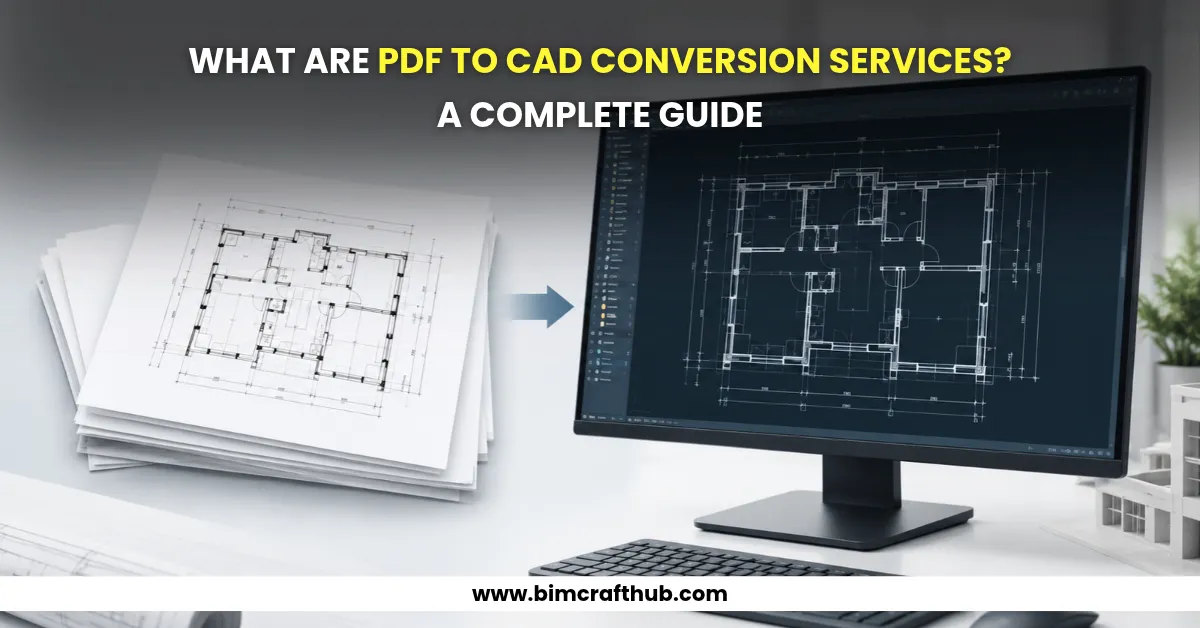
PDF to CAD conversion services help architects, engineers, contractors, and construction professionals convert PDF drawings into editable CAD files. These services are useful when existing plans, technical drawings, or scanned blueprints need to be updated, measured, or reused in new projects. With professional pdf to cad services, businesses can convert static drawings into editable DWG or DXF files while preserving important dimensions, annotations, and design details.
Whether you are renovating an existing building, modifying architectural layouts, or preparing engineering drawings, PDF to CAD conversion makes it easier to work with existing design information without recreating every drawing from scratch.
What Is PDF to CAD Conversion?
PDF to CAD conversion is the process of transforming drawings stored in PDF format into editable computer-aided design (CAD) files. These drawings may include floor plans, elevations, sections, mechanical layouts, electrical plans, plumbing drawings, and structural details.
PDF files are convenient for sharing and viewing, but they are not always suitable for design modifications. A CAD file, on the other hand, allows users to edit lines, dimensions, layers, text, and other drawing elements using software such as AutoCAD.
The conversion process depends on the source file. A vector-based PDF may contain lines and text that can be extracted more directly, while a scanned PDF is essentially an image and may require tracing, scaling, and manual drafting.
The objective is not simply to change the file extension. It is to create a usable CAD drawing that meets the project’s technical requirements.
Why Do Businesses Need PDF to CAD Conversion Services?
Many companies have years of drawings saved as PDFs, scanned documents, or archived blueprints. When these drawings need revisions, working directly from the PDF can be inconvenient and time-consuming.
Professional conversion services help make these documents useful for current design and construction work.
Key benefits include:
- Editable drawings: Modify layouts, dimensions, annotations, and other drawing elements without recreating the entire plan.
- Time savings: Reuse existing design information instead of drafting every element from the beginning.
- Improved drawing organization: Separate drawing elements into layers for easier editing and management.
- Better project coordination: Share editable drawings with architects, engineers, consultants, and contractors.
- Support for renovations: Use existing floor plans and building layouts as a starting point for proposed modifications.
- Digital documentation: Convert older paper-based or scanned records into digital CAD files for future reference.
For example, imagine a contractor preparing to renovate an office building. The available floor plans are scanned PDFs from an earlier construction phase. The architect needs to move partition walls and revise room layouts. Converting the original plans into editable CAD drawings provides a practical starting point, although important dimensions and existing conditions must still be verified before construction.
What Types of Drawings Can Be Converted from PDF to CAD?
PDF to CAD conversion supports different drawing types across architecture, engineering, and construction.
Drawing type | Typical conversion requirements |
Architectural drawings | Floor plans, elevations, sections, doors, windows, and room layouts |
Structural drawings | Column layouts, beam details, foundation plans, and reinforcement details |
Mechanical drawings | HVAC layouts, ductwork, and equipment arrangements |
Electrical drawings | Lighting layouts, circuit routes, and electrical symbols |
Plumbing drawings | Water supply, drainage, and pipe layouts |
Civil drawings | Site plans, road layouts, and utility drawings |
As-built drawings | Existing building layouts and recorded modifications |
The required level of detail depends on the intended use. A drawing prepared for general reference may need less detail than one intended for engineering coordination or construction documentation.
How Does the PDF to CAD Conversion Process Work?
A reliable conversion workflow combines file assessment, technical drafting, verification, and quality control.
1. Review the Source PDF
The first step is to assess the quality and type of the source file. The drafting team checks whether the PDF contains vector information or scanned images, identifies the drawing scale where available, and reviews dimensions, notes, symbols, and line quality.
Poor-quality scans, faded lines, and missing dimensions may require additional clarification.
2. Extract or Recreate Drawing Geometry
Vector PDFs may allow some geometry to be extracted, but the resulting files can still contain fragmented lines, incorrect text, or poorly organized elements.
Scanned drawings generally require manual tracing or redrafting. The team recreates the relevant geometry, including walls, openings, equipment, symbols, and other specified components.
3. Organize Layers and Annotations
Drawing elements are organized into appropriate CAD layers. Text, dimensions, symbols, and line types are checked so the resulting file is easier to understand and edit.
For an architectural floor plan, for instance, separate layers for walls, doors, windows, dimensions, and text can make later revisions much more manageable.
4. Check Scale and Dimensions
The converted drawing must be checked against reliable reference dimensions. If a known dimension is available, it can help establish or verify the drawing scale.
This step is especially important when working with scanned PDFs because scanning, printing, or resizing may distort the original proportions.
5. Perform Quality Checks and Deliver Files
The final drawing is reviewed for missing elements, disconnected lines, incorrect annotations, layer organization, and other drafting issues. The deliverables may include DWG or DXF files and a reference PDF, depending on the project requirements.
Where dimensions are unclear or information is missing, the conversion team should flag the issue instead of inventing measurements.
PDF to CAD Conversion: Vector PDFs vs. Scanned PDFs
The source file has a significant impact on the conversion method, turnaround time, and level of manual work required.
Feature | Vector PDF | Scanned PDF |
Source information | Often contains digital lines and text | Contains raster images of drawings |
Conversion method | Geometry extraction followed by cleanup | Tracing or manual redrafting, sometimes with image-processing tools |
Editing requirements | Cleanup and layer organization may be necessary | Geometry generally needs to be recreated |
Main challenge | Fragmented geometry and text recognition errors | Image quality, distortion, and unclear details |
Quality verification | Compare extracted geometry with the source | Verify scale, dimensions, and traced elements carefully |
Neither method guarantees a perfectly accurate CAD file automatically. The result depends on source quality, drawing complexity, conversion methods, and the quality-control process.
Common Challenges in PDF to CAD Conversion
Even seemingly simple drawings can present technical challenges.
Low-resolution scans: Thin lines and small text may be difficult to identify, requiring careful manual drafting.
Missing dimensions: If a drawing lacks reliable measurements, its original scale and geometry may not be fully recoverable from the image alone.
Complex annotations: Overlapping text, symbols, dimensions, and linework can create clutter during automatic conversion.
Incorrect scaling: Scanned or resized drawings may not match their original dimensions.
Poor layer organization: Automatically extracted geometry may be difficult to edit until the lines and annotations are properly organized.
For example, when converting an older residential floor plan, a room dimension may be readable while a door opening is blurred. A responsible drafting workflow preserves the confirmed information and requests clarification for the unclear opening rather than assuming its width.
How to Choose the Right PDF to CAD Service Provider
Before selecting a provider, consider these factors:
- Experience with technical drawings: Check whether the team handles your specific drawing type, such as architectural, structural, or MEP plans.
- Quality assurance: Ask how dimensions, geometry, annotations, and layers are verified.
- Required file formats: Confirm that the provider can deliver the DWG or DXF format your team needs.
- Source-file assessment: A reliable provider should review the PDF before confirming the scope and expected turnaround.
- Confidentiality: Discuss how project drawings and other technical information will be handled.
- Clear deliverables: Agree on the drawing scope, required detail, layer standards, revision process, and delivery schedule before work begins.
A small sample conversion can also help you evaluate drawing quality, layer organization, and communication before committing to a larger project.
Conclusion
PDF to CAD conversion services help businesses turn static drawings into editable digital files for design revisions, renovation planning, engineering work, and technical documentation. The conversion process may involve extracting vector geometry or manually redrafting scanned drawings, followed by scale verification and quality checks.
The most important consideration is the usability and reliability of the final CAD drawing, not simply the speed of conversion. Reviewing the source files, defining clear requirements, and verifying critical dimensions help ensure that the converted drawings are suitable for their intended purpose.
If your team has PDF plans, scanned blueprints, or legacy technical drawings that need to become editable CAD files, explore PDF to CAD conversion services from BIM Craft Hub to discuss your project requirements and deliverables.